Think of it as Components on steroids.
Design once. Automatically adapt your layouts to multiple formats while keeping full composition control.
Archipelago made for Figma
Generate. Adapt. Sync. Export.

Think of it as Components on steroids.
Design once. Automatically adapt your layouts to multiple formats while keeping full composition control.
Archipelago made for Figma
Generate. Adapt. Sync. Export.
Archipelago is a plugin for Figma that centralizes your content and automatically adapts it to multiple formats – from Instagram, facebook or digital displays.
Archipelago extends the tools you already master in Figma, helping you design responsive systems that stay consistent across formats while preserving the unique character of each layout.
Design once. Adapt everywhere. Sync with full layout control.
Why is Archipelago
different from tools
like Buzz?
Tools like Figma Buzz generate marketing assets from templates. Archipelago is built for designers who need multi-format workflows without sacrificing layout control.
When you need designs from the same content, instead of simplifying it into rigid templates, Archipelago builds a system where master content syncs, while each variant maintains its unique adaptations.
Control what syncs and what stays untouched, across both content and settings.
A powerful time-saving feature is the ability to define an image focus point, ensuring the most important part of every image remains visible across all formats.
1. Generate and Edit layout variants.
2. Duplicate and Sync content
3. Set an Image Focus
4. Export Artworks
Design Your Master
Begin with a solid base frame – your Master. Use Auto Layout, Constraints, and clear naming conventions.
This frame serves as the foundation for all generated Islands and the font of truth for the Archipelago. Include every element you might need across formats – you can hide or adjust them later.
Figma’s components and instances are fully supported.
The system works better if you use frames instead of groups because of Figma’s internal behaviour. Archipelago will automatically wrap any group inside a frame.
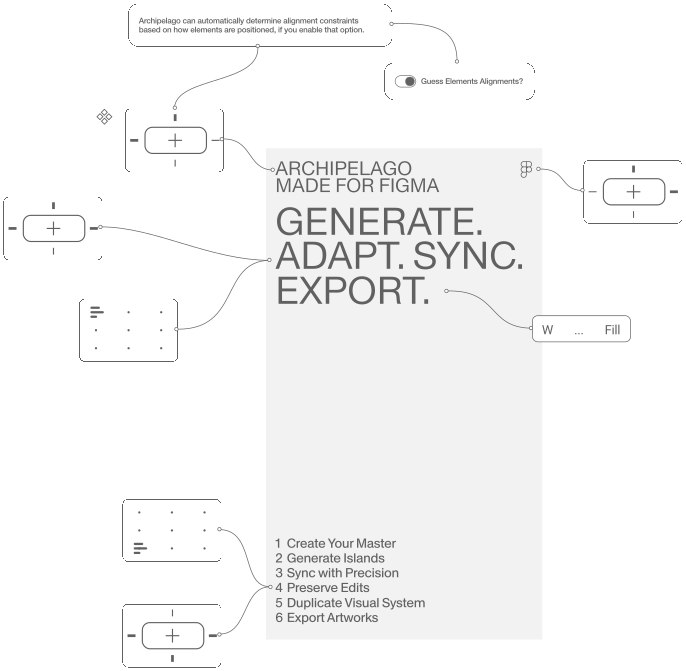
Archipelago can automatically determine alignment constraints based on how elements are positioned, if you enable that option.
Block error: "file_get_contents(): https:// wrapper is disabled in the server configuration by allow_url_fopen=0" in block type: "video"
Create the Archipelago
Open Generate Islands and select your target formats (e.g. Instagram Story, Facebook Post, etc.). You can generate all at once or add formats individually.
The plugin creates an Archipelago containing the Master and all its Islands.
MASTER
↓
ARCHIPELAGO
↓
Instagram
Facebook
Poster
Ticket
Display
Block error: "file_get_contents(): https:// wrapper is disabled in the server configuration by allow_url_fopen=0" in block type: "video"
Customize Your Islands
Edit and refine your islands. You can adjust any island freely—reorganize its internal structure, resize it, add new elements, or remove existing ones. Nothing is fixed.
Use the Sync controls to push updates from the Master to any of its Islands. You can run a global sync or sync within a specific node, selecting exactly which properties you want to update.
This is your system set up and it will be your Master Archipelago!
When an Island is selected, enabling locks from Prevent from Syncing preserves your manual adjustments. The individual filters let you control which elements are synchronized, allowing you to make extensive edits to each Island while keeping the desired content in sync.
Block error: "file_get_contents(): https:// wrapper is disabled in the server configuration by allow_url_fopen=0" in block type: "video"
Smart Image Focus
Ensure the key part of your image stays visible regardless of your artwork’s aspect ratio. Click Set Image Focus and select a focal point in the preview. Zooming in or out adjusts relative to this point (minimum zoom: 100%). Each Island’s transformations automatically adapt to its own size and ratio.
To define unique focal points for individual Islands, toggle the Lock for Island switch.
Block error: "file_get_contents(): https:// wrapper is disabled in the server configuration by allow_url_fopen=0" in block type: "video"
Duplicate Archipelagos
Use Duplicate Archipelago to create a reusable copy of a finished system. This preserves all internal relationships, properties, and logic. All islands preserve their unique locks and customizations.
Duplicated Archipelagos are ideal for new campaigns, events, or iterations built on the same structure.
Block error: "file_get_contents(): https:// wrapper is disabled in the server configuration by allow_url_fopen=0" in block type: "video"
Export Artworks
Select individual Islands or entire Archipelagos, then click Prepare to Export.
The system automatically: Renames files with prefixes (e.g. Event_X_instagram); Switches selection to the correct Islands; Enables native Figma export.
The system restores original names when export is complete.
Block error: "file_get_contents(): https:// wrapper is disabled in the server configuration by allow_url_fopen=0" in block type: "video"

What is Next?
Need video exports
from Figma?
We’re developing a dedicated lightweight desktop companion along with a new version of Archipelago that enables direct video export from your Figma files. If you’re interested in testing an early working build, get in touch and we’ll share a copy of the macOS app (compatible with both Intel and Apple Silicon).